Slice Modifier User Manual
By Chipp Walters
What is the Slice Modifier?
The Slice Modifier is a Blender modifier designed to create even spaced sliced loops in either the X, Y or Z orientation for a given Blender object.
How to Install?
-
Download the files
Slice_modifier.blend
Blender_assets.cats.txt
-
Create a new Blender Asset Library (in prefs) and name it “Slice”
-
Copy both files to the “Slice” asset library folder.
-
The new Slice modifier will now appear in the Unassigned category as shown
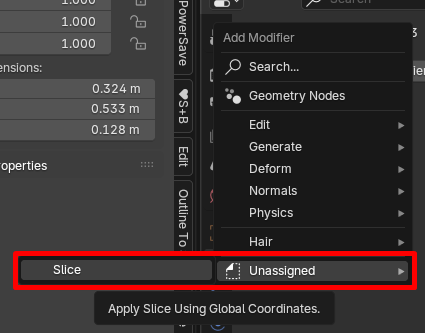
-
In order for it to appear in the Generate Section you need to edit the Slice_modifier.blend file. You can do this by right-clicking it in the Asset Browser and selecting “Open Blend File”
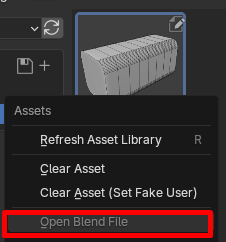
-
To make the modifier appear in the Generate Section you need to create a new category in your Slice Asset Browser collection by clicking the + button:
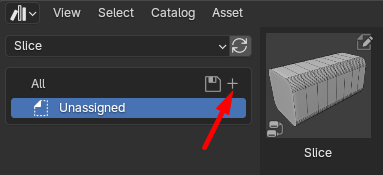
-
Rename the new category to Generate:

-
Next drag/drop the Slice thumbnail into the Generate section. The asterisk after Generate* shows it is not yet saved.

-
With the thumbnail now in the Generate section, click the save icon (or save the file) and you can now find the modifier at the bottom of the Generate section of the modifiers.
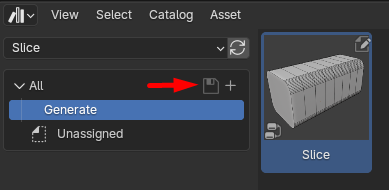

How does it work?
Apply the Slice modifier just as you would any modifier.
Interface
While the interface is very simple, there are a few things important to understand.
Complex objects can be slow to slice
If you have a real complex object, you may find it takes a long time to slice. This is why when you first add the modifier, it always appears in “Show Cage” mode– as this way you can adjust the slice numbers and direction before having it actually apply.
Merge vertices distance can affect the final model
Especially if you’re working at a different set of units (for example creating a 3D print model). Just be aware.
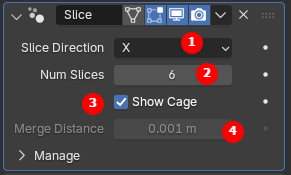 |
Direction of the slice Number of slices in the object Show the cage instead of the object Merge distance at end of operation |
|---|
Help & Links
You can get help at http://cw1.me/discord or at where you purchased the addon.